



















Summary:
A fast-loading Shopware store is crucial for user experience and SEO. While Google Page Speed Insights provides useful data, it has limitations. This blog explores its drawbacks, recommends reliable alternatives, and shares practical strategies to optimize your Shopware 6 store for real-world performance.
December 17, 2025
In today’s fast-paced digital world, more users browse websites on mobile devices and expect near-instant responses. Have you ever found yourself impatiently waiting for a page to load? 🥸 For online store owners, this impatience is critical: slow-loading websites can frustrate visitors, reduce conversions, and even impact search engine rankings. Ensuring your Shopware store loads quickly is therefore essential for providing a smooth user experience.
While page speed analysis is a vital part of website optimization, not all tools give you the full picture. One of the most widely used tools is Google Page Speed Insights. Despite its popularity, it isn’t always the most reliable indicator of real-world performance, especially for complex e-commerce platforms like Shopware.
In this article, we’ll explore what Google Page Speed Insights measures, why it’s limited, and what pitfalls to watch out for, so you can better assess and enhance your store’s load times.
What Is Google Page Speed Insights?
Google Page Speed Insights is a free tool created by Google to evaluate how fast a website loads and to provide suggestions for improving performance. It’s widely used by web developers and store owners to identify areas where their sites can be optimized.
The tool examines multiple aspects of a website, such as image sizes, resource loading, code efficiency, and browser caching configurations. After analyzing your site, it assigns a score from 0 to 100 and offers actionable recommendations to enhance load times.
Beyond performance scoring, Page Speed Insights can reveal underlying issues that may slow down your website. These might include excessive redirects, missing or incorrect HTML tags, or slow server response times.
While Google Page Speed Insights is a helpful starting point for understanding website performance, it shouldn’t be considered the ultimate authority especially for feature-rich e-commerce platforms like Shopware. Later, we’ll discuss why relying solely on this tool can be misleading.
But why is website speed even so important? Surely, not every visitor is impatient, right?
Why Website Loading Speed Matters
A fast-loading website is essential for any online store, and there are two main reasons why: it impacts both user experience and search engine performance.
User Experience
The speed at which your website loads directly affects how visitors interact with it. Slow load times can frustrate users, causing them to leave your Shopware store and browse a competitor’s site instead. On the other hand, a fast website creates a smoother and more enjoyable experience, encouraging customers to stay, explore your products, and engage with your content.
SEO
Website speed also plays a key role in search engine optimization. Google and other search engines consider loading times as a ranking factor, meaning slow websites are likely to appear lower in search results. Conversely, a well-optimized, fast-loading Shopware store can achieve better visibility and attract more organic traffic.
In today’s fast-paced digital environment, where users expect immediate responses, optimizing your website speed is more important than ever. A quick-loading Shopware store not only improves the user experience but also enhances your chances of ranking higher in search results.
Want to dive deeper into SEO tips for e-commerce? 🤓 Check out this article for more insights.

How to Boost Your Shopware Store’s Loading Speed
There are multiple strategies to enhance your store’s loading speed and ensure a seamless user experience. Here are some effective methods:
Optimize Images: Large or uncompressed images can significantly slow down your site. Always upload images in the right dimensions and compress them without sacrificing quality to reduce load times.
Limit HTTP Requests: Every file on your website images, CSS, JavaScript requires a separate request to the server. Minimize these requests by combining files where possible and removing unnecessary resources.
Leverage Caching: Browser caching stores parts of your website locally on the user’s device, speeding up future visits. Make sure your caching settings are correctly configured for optimal performance.
Minify Code: Extra spaces, comments, or unused code can increase loading times. Streamline and minify your HTML, CSS, and JavaScript to improve efficiency.
Use a Content Delivery Network (CDN): CDNs deliver resources from servers close to the user, reducing latency. They can also help load non-critical files later, improving perceived performance.
Review Your Hosting Plan: If your store still feels sluggish, your hosting plan could be the bottleneck. Upgrading to a more robust plan or server can make a noticeable difference.
Improving loading speed is an ongoing process that requires monitoring and fine-tuning. While tools like Google Page Speed Insights can help measure performance, other solutions provide more actionable insights for complex e-commerce platforms like Shopware.
That said, in our experience, Google Page Speed isn’t always the most reliable. Next, let’s explore the limitations of this tool and why you should approach its recommendations carefully.
Limitations of Google Page Speed Insights
While Google Page Speed Insights is widely used to evaluate website loading speed, it has its limitations. Before diving into the drawbacks, it’s worth noting that some of its metrics are reliable and trustworthy, such as:
- Accessibility
- Best Practices
- SEO
These indicators can be confidently used as part of your website analysis.
However, there are several common issues and misleading results that store owners should be aware of:
Inconsistent Results: The same website can produce different scores depending on the testing location, server, or network conditions. This makes it hard to rely solely on one measurement.
Vague Error Messages: When the tool identifies performance issues, the error messages can be unclear or overly technical, making it difficult for non-developers to interpret.
Misguided Prioritization: Page Speed Insights sometimes emphasizes optimizations that have minimal real-world impact, leading store owners to spend time on less important improvements.
Outdated Recommendations: Although Google frequently updates the tool, some suggestions may no longer be relevant to modern web technologies. Always verify recommendations with other sources.
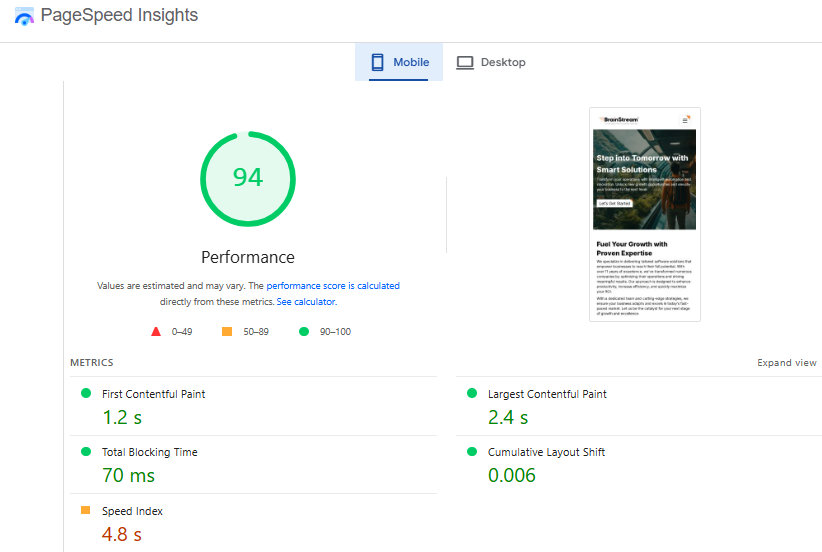
Unrealistic Testing Conditions: For example, the tool often simulates a 7-year-old throttled smartphone, which does not reflect the devices most users actually use.
Theoretical Data vs. Real Users: Search engines base rankings on real user experiences rather than simulated scores, meaning high Page Speed scores don’t automatically translate to better SEO.
Penalization of Tracking Scripts: Sites with essential tracking scripts are often penalized in the score, even though these scripts are crucial for marketing and sales analysis. This is a classic case of incorrect prioritization.
Obsolete Metrics: Metrics like Total Blocking Time are becoming outdated and will soon be removed, yet they still influence current scores sometimes unfairly lowering performance ratings.
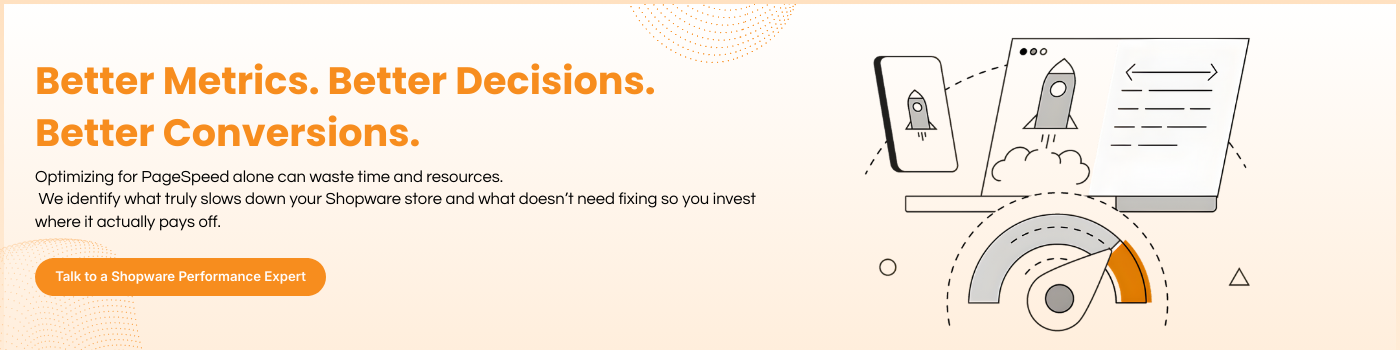
Despite these limitations, Google Page Speed Insights can still serve as a useful starting point for improving your Shopware store’s load times. However, it’s important to remember that the scores are indicative rather than definitive. Paid tools and modern performance testing platforms often provide more accurate, actionable insights because they use up-to-date technologies.
Ultimately, the best approach is to combine Page Speed Insights with other analytics tools and your own observations to ensure a fast, user-friendly Shopware store. So, what alternative tools can you rely on?
Alternatives to Google Page Speed Insights and Our Approach
While Google Page Speed Insights is widely recognized and free, it isn’t always the most accurate tool for assessing real-world website performance. Its popularity comes partly from being easy to use and widely known, but as we’ve discussed, it has several limitations.
In daily agency work, relying solely on Google Page Speed can sometimes be misleading. Inaccurate or misinterpreted scores may cause unnecessary optimization efforts, especially by less experienced shopware developers. Many store owners also request improvements based on these scores, even if their Shopware store is already performing well.
That’s why, in professional practice, Page Speed Insights should be used only as a general reference. For deeper insights, more advanced tools are recommended. Here are some reliable alternatives we often use at our Shopware agency:
GTmetrix: Offers detailed reports on website performance, including load time, page size, and optimization priorities. It uses similar metrics to Google Page Speed but provides more actionable insights.
Pingdom: A widely used tool that measures website speed from multiple locations worldwide, giving detailed performance reports and improvement suggestions.
WebPageTest.org: A free, highly detailed performance testing platform that lets you simulate real-world conditions from various global locations. This is one of the primary tools we use for analyzing Shopware 6 stores.
Lighthouse: Google’s open-source tool, built into Chrome, evaluates load speed, accessibility, and best practices, providing a more technical assessment than Page Speed Insights.
YSlow: A free browser plugin from Yahoo! that measures loading speed and provides optimization suggestions based on metrics like HTTP requests and page size.
Using a combination of these tools gives a more comprehensive and realistic view of your Shopware store’s performance. It allows you to prioritize optimizations that truly matter and avoid wasting resources on minor or theoretical issues.
So, what’s the final takeaway on Google Page Speed Insights?
Conclusion and Recommendations
Google Page Speed Insights can serve as a helpful guide for improving the performance and user experience of your website. However, it’s important not to overreact to a low score, as the tool has its limitations and sometimes produces misleading results. Additionally, search engines and ad platforms don’t rely solely on these metrics for ranking, so a “perfect” score isn’t necessary for success.
That said, using Page Speed Insights wisely can still help you enhance your Shopware store’s loading speed, which benefits both user experience and search engine visibility. To get the most out of the tool, it’s best to complement it with other performance measurement sources and your own testing. Employ multiple tools and strategies to monitor and optimize your Shopware 6 store, ensuring that the recommendations are up-to-date and relevant.
Equally important is prioritizing optimizations. Focus on the changes that have the greatest impact on loading speed rather than spending time on minor tweaks. A fast store is essential, but a website must also remain user-friendly, visually appealing, and engaging.
In summary, Google Page Speed Insights is a valuable starting point for improving your Shopware store, but it should be combined with other tools, professional insights, and practical testing. By doing so, you can create a fast, reliable, and enjoyable online store that satisfies both your visitors and search engines.

Manish Khilwani 

Co-Founder at BrainStream Technolabs, he focuses on building people-first, scalable eCommerce and digital products that help brands grow with clarity and innovation.
Share :


Related Blog

Shopware
How Much Does Shopware Cost? Complete Pricing Guide for 2026
If you are planning to build a modern eCommerce store. Shopware is one of the most powerful platforms available today, especially in Europe. Growing brands and enterprise-level businesses widely use Shopware because it offers flexibility, scalability, and powerful headless commerce...

Shopware
Shopware Community Day 2026: The Ultimate Global Event for the Shopware Ecosystem
Shopware Community Day 2026 (SCD 2026) is more than just an ecommerce conference; it is the most important annual event for the global Shopware community. From extension partners to merchants and technology innovators, SCD 2026 brings together everyone building, scaling,...

Shopware
Shopware Gateways: A Flexible Way to Extend Shopware
A Shopware gateway acts as a dedicated communication layer between a Shopware store and external App servers. Each gateway is designed for a specific integration area, such as checkout processes, customer context handling, or in-app purchases, while relying on a...


Keep up-to-date with our newsletter.
Sign up for our newsletter to receive weekly updates and news directly to your inbox.