Securing Symfony APIs with JWT Authentication
This guide shows you how to secure a Symfony 7.2 REST API with JWT authentication using lexik/jwt-authentication-bundle. You’ll set up user registration with validation, a rate-limited login endpoint, and protect routes like /api/users/{id} and /api/profile.
Understanding JWT Authentication
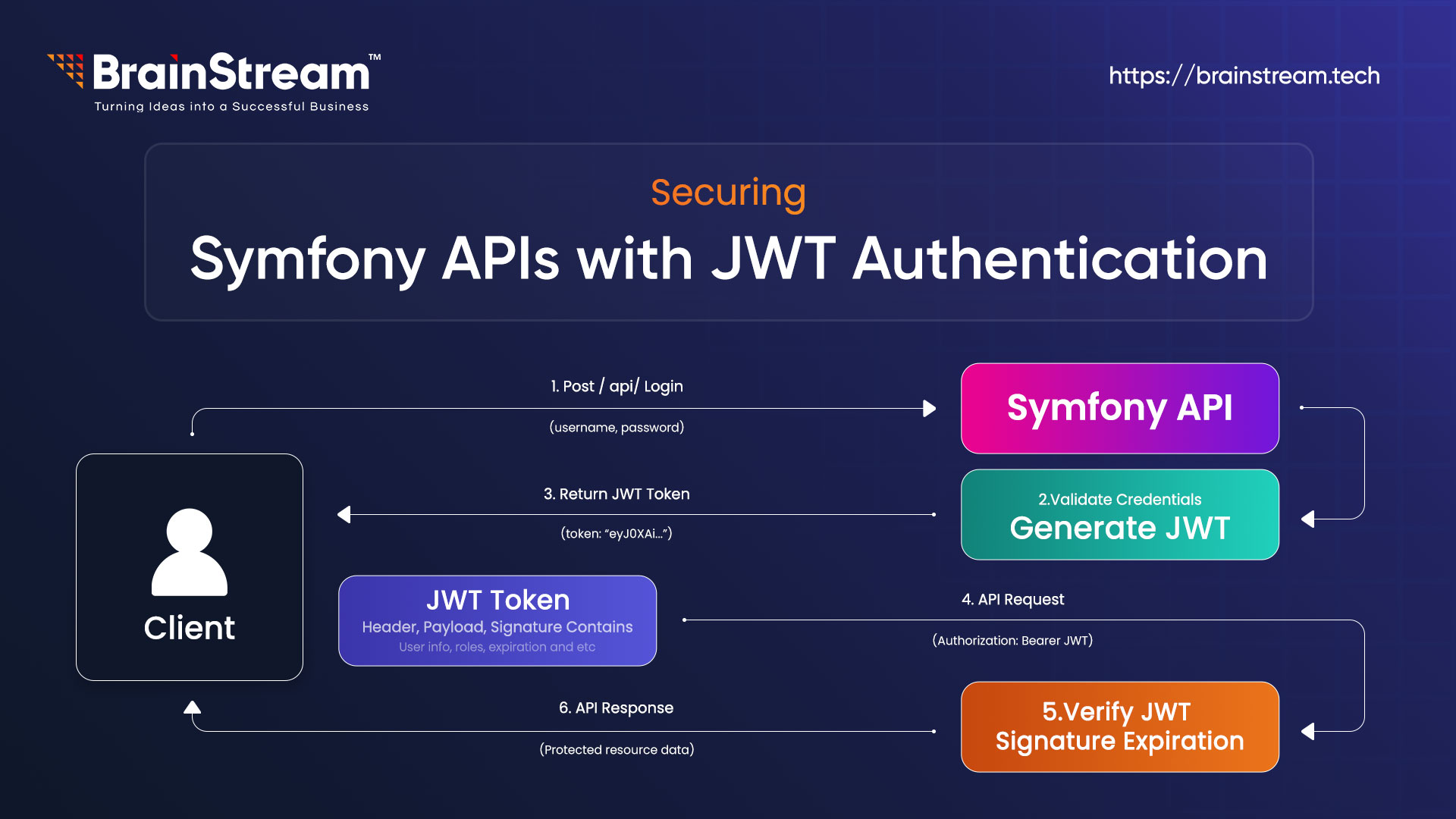
JSON Web Token (JWT) is a popular standard for securing APIs. It’s a compact, self-contained token that carries information between a client and a server. A JWT consists of three parts: Header, Payload, and Signature, separated by dots (e.g., header.payload.signature). The header defines the token type and signing algorithm; the payload contains user data, such as email or roles, and the signature ensures the token hasn’t been tampered with.
Here’s how JWT authentication works in your Symfony API:
- Login: A user sends their email and password to /api/login_check. If valid, the server generates a JWT, signs it with a private key, and sends it back.
- Access Protected Routes: The user includes the JWT in the Authorisation header (e.g., Bearer <token>) when requesting endpoints, such as /api/users/{id}. The server verifies the token using a public key.
Stateless Security: Unlike traditional sessions, JWT is stateless—no server-side storage is needed. The token itself holds all necessary info, making it ideal for scalable APIs.
Why use JWT in Symfony?
- Secure: Tokens are signed, preventing tampering.
- Scalable: Stateless design supports distributed systems.
- Symfony-Friendly: The lexik/jwt-authentication-bundle simplifies integration, handling token generation and validation seamlessly.
In this guide, you’ll implement JWT to secure your API, ensuring only authenticated users can access protected routes while keeping the process lightweight and efficient.
Prerequisites
- PHP 8.2+
- MySQL 8.0.42
- Composer
- Symfony CLI
Step 1: Set Up the Project
Create a Symfony 7.2 project and install dependencies:
composer create-project symfony/skeleton brainstream_symfony7_jwt_demo
cd brainstream_symfony7_jwt_demo
composer require symfony/orm-pack symfony/maker-bundle doctrine/doctrine-fixtures-bundle lexik/jwt-authentication-bundle security validator symfony/rate-limiter
Edit .env.local to configure MySQL:
DATABASE_URL="mysql://user:your_secure_password@localhost:3306/brainstream_symfony7_jwt_demo?serverVersion=8.0&charset=utf8mb4"
Create the database:
php bin/console doctrine:database:create
Step 2: Create the User Entity
Generate a user entity for authentication:
php bin/console make: user
- Name: User
- Doctrine ORM: yes
- Store password: yes
- Email/password login: yes
Edit src/Entity/User.php to add name and validation:
<?php
// src/Entity/User.php
namespace App\Entity;

use App\Repository\UserRepository;
use Doctrine\ORM\Mapping as ORM;
use Symfony\Component\Security\Core\User\PasswordAuthenticatedUserInterface;
use Symfony\Component\Security\Core\User\UserInterface;
use Symfony\Component\Validator\Constraints as Assert;

#[ORM\Entity(repositoryClass: UserRepository::class)]
#[ORM\Table(name: 'user')]
class User implements UserInterface, PasswordAuthenticatedUserInterface
{
    #[ORM\Id]
    #[ORM\GeneratedValue]
    #[ORM\Column]
    private ?int $id = null;

    #[ORM\Column(length: 180, unique: true)]
    #[Assert\NotBlank(message: "Email is required")]
    #[Assert\Email(message: "Invalid email format")]
    private ?string $email = null;

    #[ORM\Column]
    private array $roles = [];

    #[ORM\Column]
    #[Assert\NotBlank(message: "Password is required")]
    private ?string $password = null;

    #[ORM\Column(length: 255)]
    #[Assert\NotBlank(message: "Name is required")]
    #[Assert\Length(min: 2, minMessage: "Name must be at least 2 characters")]
    private ?string $name = null;

    public function getId(): ?int { return $this->id; }

    public function getEmail(): ?string { return $this->email; }

    public function setEmail(string $email): static
    {
        $this->email = $email;
        return $this;
    }

    public function getUserIdentifier(): string { return (string) $this->email; }

    public function getRoles(): array
    {
        $roles = $this->roles;
        $roles[] = 'ROLE_USER';
        return array_unique($roles);
    }

    public function setRoles(array $roles): static
    {
        $this->roles = $roles;
        return $this;
    }

    public function getPassword(): ?string { return $this->password; }

    public function setPassword(string $password): static
    {
        $this->password = $password;
        return $this;
    }

    public function eraseCredentials(): void {}

    public function getName(): ?string { return $this->name; }

    public function setName(string $name): static
    {
        $this->name = $name;
        return $this;
    }
}

Apply migrations:

php bin/console make:migration

php bin/console doctrine:migrations:migrate
Apply migrations:
php bin/console make: migration
php bin/console doctrine:migrations:migrate
Step 3: Add Sample User Data
Create src/DataFixtures/AppFixtures.php:
<?php
// src/DataFixtures/AppFixtures.php
namespace App\DataFixtures;

use App\Entity\User;
use Doctrine\Bundle\FixturesBundle\Fixture;
use Doctrine\Persistence\ObjectManager;
use Symfony\Component\PasswordHasher\Hasher\UserPasswordHasherInterface;

class AppFixtures extends Fixture
{
    public function __construct(private UserPasswordHasherInterface $passwordHasher) {}

    public function load(ObjectManager $manager): void
    {
        $user = new User();
        $user->setEmail('jane@example.com');
        $user->setName('Jane Doe');
        $user->setRoles(['ROLE_USER']);
        $user->setPassword($this->passwordHasher->hashPassword($user, 'password123'));
        $manager->persist($user);
        $manager->flush();
    }
}
Load fixtures:
php bin/console doctrine:fixtures:load --no-interaction
Step 4: Configure JWT and Security
Generate JWT keys:
php bin/console lexik:jwt:generate-keypair

Edit config/packages/lexik_jwt_authentication.yaml:
lexik_jwt_authentication:
    secret_key: '%kernel.project_dir%/config/jwt/private.pem'
    public_key: '%kernel.project_dir%/config/jwt/public.pem'
    pass_phrase: '%env(JWT_PASSPHRASE)%'
    token_ttl: 3600

Edit .env.local to add:
JWT_PASSPHRASE=your_secure_passphrase

Edit config/packages/rate_limiter.yaml:
framework:
    rate_limiter:
        login_limiter:
            policy: token_bucket
            limit: 5
            rate: { interval: '1 minute', amount: 1 }

Edit config/packages/security.yaml:
security:
    password_hashers:
        App\Entity\User: 'auto'

    providers:
        app_user_provider:
            entity:
                class: App\Entity\User
                property: email

    firewalls:
        dev:
            pattern: ^/(_(profiler|wdt)|css|images|js)/
            security: false

        login:
            pattern: ^/api/login_check
            stateless: true
            json_login:
                check_path: /api/login_check
                username_path: email
                password_path: password
                success_handler: lexik_jwt_authentication.handler.authentication_success
                failure_handler: lexik_jwt_authentication.handler.authentication_failure
            limiter: login_limiter

        api:
            pattern: ^/api
            stateless: true
            jwt: ~

    access_control:
        - { path: ^/api/login_check, roles: PUBLIC_ACCESS }
        - { path: ^/api/register, roles: PUBLIC_ACCESS }
        - { path: ^/api, roles: IS_AUTHENTICATED_FULLY }

when@test:
    security:
        password_hashers:
        Symfony\Component\Security\Core\User\PasswordAuthenticatedUserInterface:
                algorithm: auto
                cost: 4
                time_cost: 3
                memory_cost: 10
Step 5: Create Controllers and Test
Create src/Controller/UserController.php:
<?php
// src/Controller/UserController.php
namespace App\Controller;

use App\Entity\User;
use Symfony\Bundle\FrameworkBundle\Controller\AbstractController;
use Symfony\Component\HttpFoundation\JsonResponse;
use Symfony\Component\HttpFoundation\Response;
use Symfony\Component\Routing\Annotation\Route;
use Symfony\Component\Security\Http\Attribute\CurrentUser;

class UserController extends AbstractController
{
    #[Route('/api/users/{id}', methods: ['GET'])]
    public function getUserById(User $user): JsonResponse
    {
        return $this->json([
            'id' => $user->getId(),
            'name' => $user->getName(),
            'email' => $user->getEmail(),
            'roles' => $user->getRoles(),
        ]);
    }

    #[Route('/api/users/me', methods: ['GET'])]
    public function getCurrentUser(#[CurrentUser] ?User $user): JsonResponse
    {
        if (null === $user) {
            return $this->json(['error' => 'User not found'], Response::HTTP_NOT_FOUND);
        }
        return $this->json([
            'id' => $user->getId(),
            'email' => $user->getEmail(),
            'name' => $user->getName(),
            'roles' => $user->getRoles(),
        ]);
    }}

Create src/Controller/AuthController.php:
<?php
// src/Controller/AuthController.php
namespace App\Controller;

use App\Entity\User;
use Doctrine\ORM\EntityManagerInterface;
use Lexik\Bundle\JWTAuthenticationBundle\Services\JWTTokenManagerInterface;
use Symfony\Bundle\FrameworkBundle\Controller\AbstractController;
use Symfony\Component\HttpFoundation\JsonResponse;
use Symfony\Component\HttpFoundation\Request;
use Symfony\Component\HttpFoundation\Response;
use Symfony\Component\PasswordHasher\Hasher\UserPasswordHasherInterface;
use Symfony\Component\Routing\Annotation\Route;
use Symfony\Component\Validator\Validator\ValidatorInterface;

class AuthController extends AbstractController
{
    public function __construct(
        private EntityManagerInterface $entityManager,
        private UserPasswordHasherInterface $passwordHasher,
        private JWTTokenManagerInterface $jwtManager,
        private ValidatorInterface $validator
    ) {}

    #[Route('/api/register', methods: ['POST'])]
    public function register(Request $request): JsonResponse
    {
        $data = json_decode($request->getContent(), true);
        if (!isset($data['password']) || strlen($data['password']) < 8) {
            return $this->json(['error' => 'Password must be at least 8 characters'], Response::HTTP_BAD_REQUEST);
        }

        $user = new User();
        $user->setEmail($data['email']);
        $user->setName($data['name']);
        $user->setPassword($this->passwordHasher->hashPassword($user, $data['password']));

        $errors = $this->validator->validate($user);
        if (count($errors) > 0) {
            $errorMessages = [];
            foreach ($errors as $error) {
                $errorMessages[$error->getPropertyPath()] = $error->getMessage();
            }
            return $this->json(['errors' => $errorMessages], Response::HTTP_BAD_REQUEST);
        }

        $this->entityManager->persist($user);
        $this->entityManager->flush();

        return $this->json([
            'message' => 'User registered',
            'user' => ['id' => $user->getId(), 'email' => $user->getEmail(), 'name' => $user->getName()]
        ], Response::HTTP_CREATED);
    }

    #[Route('/api/login_check', methods: ['POST'])]
    public function login(): void
    {
        throw new \RuntimeException('This method should not be called directly.');
    }

    #[Route('/api/profile', methods: ['GET'])]
    public function getProfile(): JsonResponse
    {
        $user = $this->getUser();
        if (!$user instanceof User) {
            return $this->json(['error' => 'User not found'], Response::HTTP_NOT_FOUND);
        }
        return $this->json([
            'id' => $user->getId(),
            'email' => $user->getEmail(),
            'name' => $user->getName(),
            'roles' => $user->getRoles(),
        ]);
    }
}

Test the API:
php bin/console cache:clear
symfony server:start- Register:
curl -X POST https://127.0.0.1:8000/api/register -H “Content-Type: application/json” -d ‘{“email”:”test@example.com”,” name”:” John”,” password”:”test12345″}’
2. Login:
curl -X POST https://127.0.0.1:8000/api/login_check -H “Content-Type: application/json” -d ‘{“email”:”jane@example.com”,”password”:”password123″}’
3. Access protected endpoint (use token from login):
curl -X GET https://127.0.0.1:8000/api/users/1 -H “Authorization: Bearer <your_token>”
Conclusion
You’ve built a secure Symfony 7.2 REST API with JWT authentication, user validation, and rate limiting. Your API is now protected and ready for production!!
At Brainstream Technolabs, we specialise in Symfony development and can help you build secure, high-performance web applications tailored to your business needs.
Looking to hire expert Symfony developers? Explore our Symfony Development Services and let’s build something great together.

Anand Dattani
Author
Anand Dattani is a Senior Developer at BrainStream Technolabs. He is an experienced developer specializing in PHP and modern MVC frameworks, with expertise in backend architecture and building scalable web solutions.
Table of contents
BLOGS
Learn & Grow with Us
Get the latest updates on trends and strategies that shape the business world. Our insights are here to keep you informed and inspired.

Agentic Commerce in 2026: How AI Agents Are Changing Online Shopping
Online shopping is entering a new phase. For years, shoppers…

Top 7 Must-Have Bagisto Extensions to Improve Your eCommerce Store in 2026
Running an online store takes more than adding products and…

8 Best Ecommerce Platforms for Your Online Store in 2026
Choosing the best e-commerce platform is one of the biggest…

Top 10 Shopware Development Companies in India 2026
Looking for a Shopware development company in India? Choosing a…