
Social Proof – Recent Sales Notifications (GDPR Compliant)
Shopware
Display recent sales information on your product detail page to drive customer engagement. Show the number of products sold or, display the number…

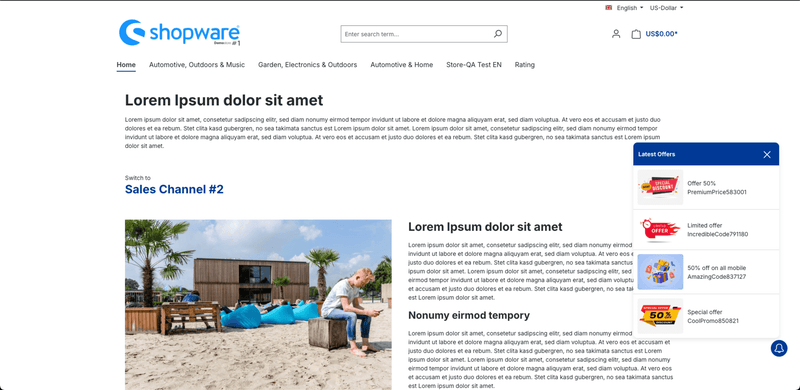
Show flash offers with an interactive notification bell. Display live deals, highlight promotions, and let customers access offers instantly in your Shopware store.
Increase customer attention and make your promotions more visible with a floating promo bell for your Shopware 6 storefront.
This plugin allows you to display active offers, flash deals, discounts, coupon campaigns, and special promotions in a floating notification bell. Customers can click the bell from any page and instantly view all available offers in one place.
Instead of hiding discounts across banners, categories, or product pages, this plugin helps you highlight your campaigns directly in the storefront and guide customers toward available deals.
Annually €1.25* /month €30.00 * €15.00* /year
Monthly €2.50* /month Cancelable monthly
1.2.0 (6.7.0.0 – 6.7.14.1)
23 March 2026
1.1.0 (6.6.0.0 – 6.6.10.25)
23 May 2025
1.0.0 (6.6.0.0 – 6.7.14.1)
28 April 2025
Shopware
Display recent sales information on your product detail page to drive customer engagement. Show the number of products sold or, display the number…

Shopware
Create and manage multiple wishlists in Shopware. Customers organize products into named lists, improve shopping experience, and increase conversions with flexible wishlist management.
Shopware
It revolutionises how customers interact with your Shopware store, making shopping quicker and more intuitive. Try "Quickview in Sidebar" today and transform your…

Shopware
Extend Shopware’s “Assign to” dropdown to support property options — add custom fields directly to product properties. So you can user property option…
Tell us what you need for Promo Bell – Offers & Discounts.

Turn Your
Ideas Into,
Digital Growth



Future-ready AI and software solutions built
around your business goals.
Trusted by Our Clients






Reviews
There are no reviews yet.