8 Must-Have Shopify Apps to Grow Your Store in 2026
Looking for the best Shopify apps to increase sales in 2026? The right apps can help you improve product discovery, create urgency, increase average order value, reduce support friction, and automate backend operations.
As your business expands, you may need to manage more products, answer more customer questions, run promotions, improve product discovery, connect your ERP, or even work with multiple vendors.
Trying to handle everything manually can quickly become time-consuming.
This is where the right Shopify apps can help.
Instead of installing dozens of tools, merchants should focus on apps that solve specific business problems. Some apps can automate operations, while others can improve the shopping experience or help increase sales.
In this guide, we explore 8 must-have Shopify apps for 2026 covering ERP integration, product discovery, FAQs, product labels, flash deals, promotional banners, multi-vendor marketplaces, and more.
Why Are Shopify Apps Important for Store Growth?
Every Shopify business has different requirements.
A fashion store may need better product labels and recommendations. A growing B2B business may need Shopify and ERP integration. Meanwhile, another business may want to transform its store into a marketplace with multiple vendors.
The right Shopify apps can help merchants:
- Automate repetitive operations
- Improve product discovery
- Reduce customer support workload
- Highlight promotions and offers
- Create urgency around deals
- Improve the mobile shopping experience
- Connect Shopify with business systems
- Manage multiple vendors
- Increase cross-selling opportunities
- Deliver a smoother customer experience
Let’s look at the top 8 apps that address these challenges.
1. OdooStream – OdooSync Utility
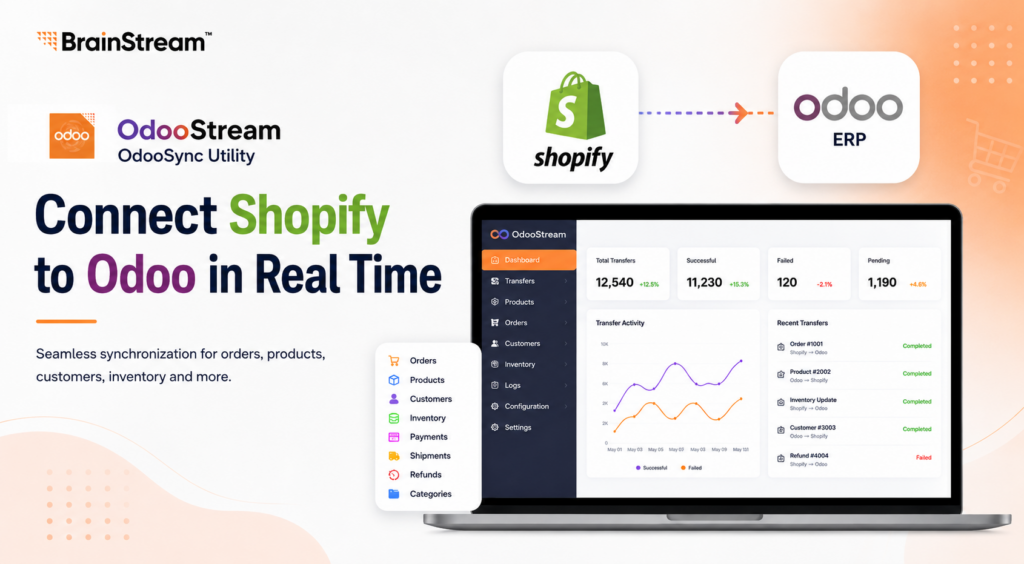
Best for: Shopify stores using Odoo ERP
Managing Shopify and Odoo separately can create unnecessary work.
Orders may need to be entered manually. Inventory levels can become inconsistent. Product and customer information may exist in two different systems.
OdooStream – OdooSync Utility is designed to connect Shopify with Odoo ERP and keep important business data synchronized.
The app supports both manual and real-time data transfers between Shopify and Odoo.
Businesses can sync customers, products, orders, inventory, payments, shipments, refunds, and categories. Real-time webhooks and scheduled bulk imports help businesses control how data moves between platforms.
Key Features of OdooStream
- Bidirectional Shopify and Odoo synchronization
- Manual and real-time data transfers
- Product, customer and order synchronization
- Inventory synchronization
- Payment, shipment and refund synchronization
- Inventory location mapping between Shopify and Odoo warehouses
- Queue-based processing
- Automatic retries and error recovery
- Real-time transfer dashboard
- Detailed transfer logs
- Historical data import wizard
- Flexible module configuration
- Multi-store management support
The modular approach is particularly useful for businesses that don’t want to synchronize everything. Merchants can choose which modules should transfer between Shopify and Odoo.
The dashboard also provides visibility into transfer activity, making it easier to identify synchronization issues.
Who Should Use OdooStream?
OdooStream is worth considering if your company:
- Uses Shopify for ecommerce
- Uses Odoo for ERP operations
- Manages large numbers of orders or products
- Wants to reduce manual data entry
- Operates multiple inventory locations
- Needs more visibility into data synchronization
By connecting ecommerce and ERP operations, businesses can spend less time moving information between systems and more time growing their store.
2. Quick View – Make Product Browsing Faster
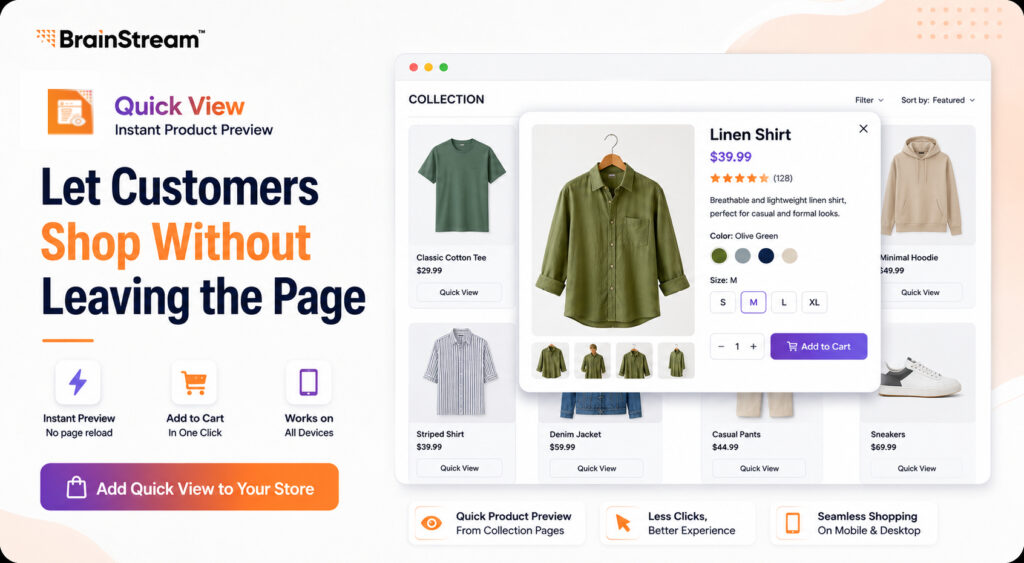
Best for: Stores with large product collections
Customers often browse several products before deciding what to buy.
Opening a separate product page every time they want to check basic information can add unnecessary steps to the shopping journey.
Quick View solves this problem by allowing shoppers to preview product information directly from the catalog.
A customer can open a Quick View pop-up, check important product details, and add the item to their cart without leaving the page.
Key Features
- Preview product information from catalog pages
- Product Quick View pop-up
- No page reload required
- Add products directly to cart
- Customizable appearance
- Responsive design
- Works across desktop and mobile
- No complicated browsing process
This can be especially useful for stores with many products.
For example, imagine a fashion store with hundreds of shirts. Instead of opening a new page for each shirt, shoppers can quickly browse different products on the collection page.
Fewer unnecessary clicks can create a smoother shopping experience.
Who Should Use Quick View?
Consider Quick View if you run:
- Fashion stores
- Beauty stores
- Electronics stores
- Home and furniture stores
- Large product catalogs
- Mobile-focused ecommerce stores
It is also currently listed as a free app, making it easy for merchants to test the experience.
3. MarketFox MultiVendor
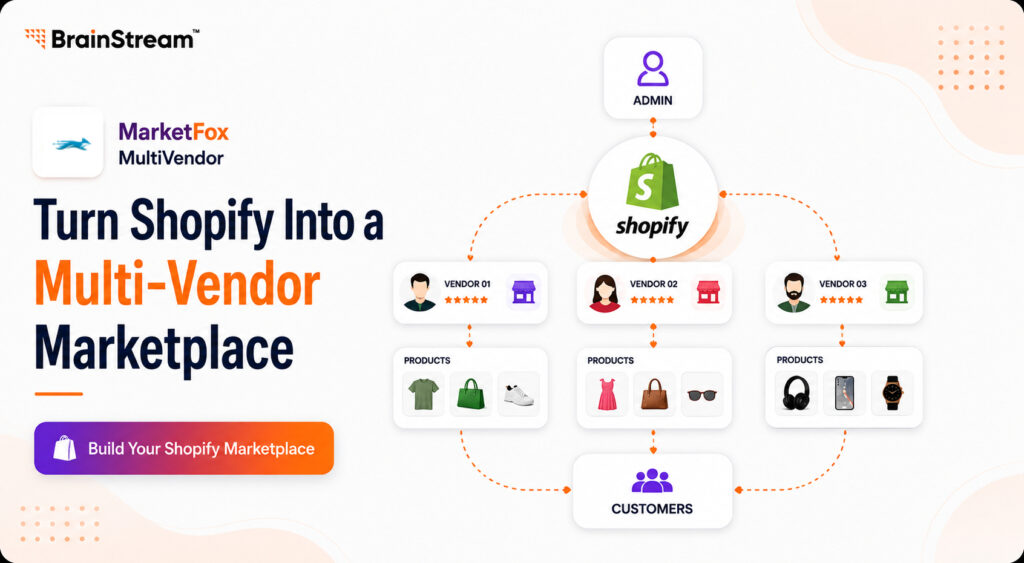
Best for: Building a multi-vendor marketplace with Shopify
A traditional Shopify store usually has one merchant managing the catalog.
A marketplace works differently.
Multiple independent sellers may need to upload products, manage inventory, process orders, and receive payouts.
MarketFox MultiVendor is designed to turn a Shopify store into a multi-vendor marketplace.
Each seller can operate within a dedicated vendor environment, while the marketplace owner retains centralised control.
Key Features
MarketFox includes:
- Vendor registration
- Vendor approval system
- Vendor product management
- Inventory management
- Flexible commission rules
- Vendor and admin order management
- Dedicated vendor dashboard
- Product approval
- Payout tracking
- Marketplace administration
Its current plans also include capabilities such as sub-order management, commission handling, vendor KYC and onboarding, product catalog synchronization, and GST invoice generation.
For larger operations, its Enterprise offering includes additional capabilities such as a white-label vendor portal and custom webhook integrations.
Who Is MarketFox For?
MarketFox can be useful for entrepreneurs planning marketplaces for:
- Fashion
- Handmade goods
- Electronics
- Local sellers
- B2B suppliers
- Food businesses
- Specialty products
- Independent brands
Instead of developing a marketplace platform completely from scratch, businesses can use Shopify as their commerce foundation and add marketplace functionality.
4. Matchify – Similar Products
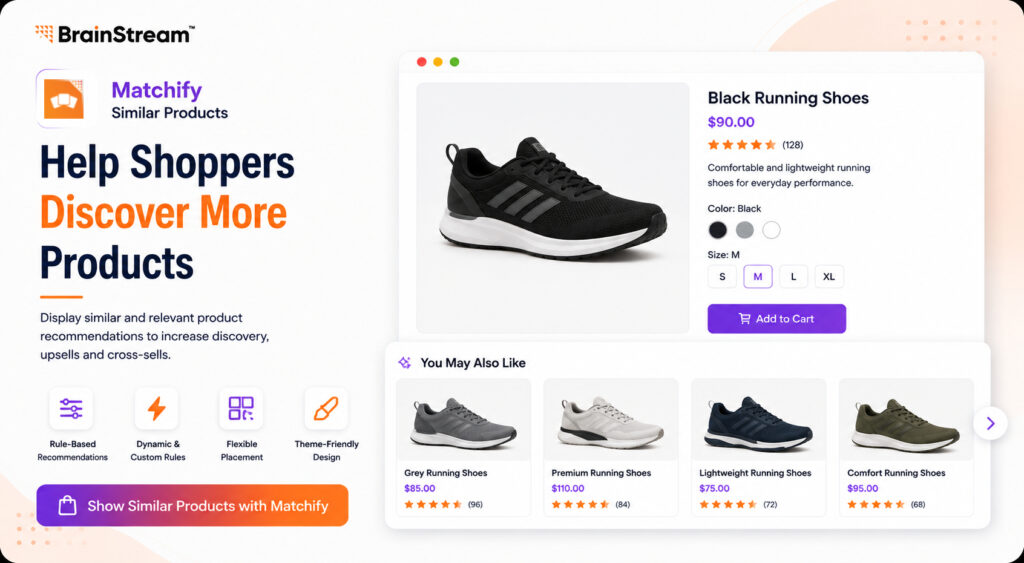
Best for: Product discovery, upselling and cross-selling
A customer may like a product without being ready to purchase that exact item.
Maybe they want another color.
Perhaps the price isn’t right.
Or they simply want to compare alternatives.
If there is nowhere else to go, they may leave.
Matchify – Similar Products helps merchants display relevant and similar product recommendations.
Key Features
- Rule-based product recommendations
- Dynamic recommendation rules
- Customizable rules
- Flexible placement
- Theme-friendly design customization
- One-click setup
- Similar product recommendations
Merchants can configure recommendation logic rather than relying on a fixed related-products section.
This gives stores more control over what customers see.
Example
Suppose someone is viewing:
Black Running Shoes – $90
Matchify could help the store surface other relevant options such as:
- Grey Running Shoes – $85
- Premium Running Shoes – $110
- Lightweight Running Shoes – $75
Instead of reaching a dead end, the shopper has more products to explore.
Product recommendations can therefore support product discovery while creating additional upsell and cross-sell opportunities.
5. BS Flash Deals – Create Urgency Around Promotions
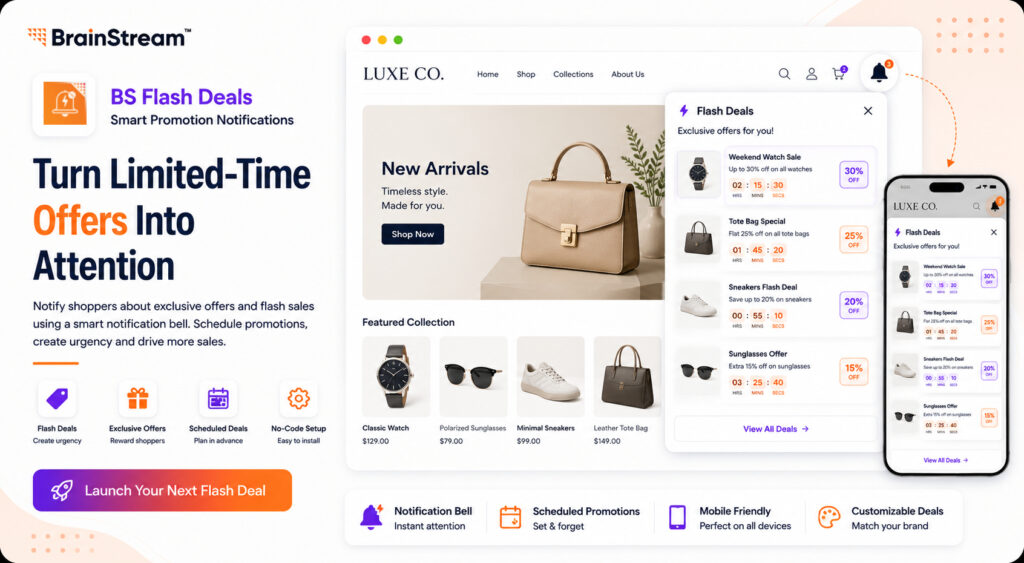
Best for: Limited-time promotions and special offers
Promotions don’t work if customers don’t notice them.
BS Flash Deals provides another way to surface offers without constantly interrupting the shopping experience.
BS Flash Deals uses a notification-bell approach to bring attention to deals and promotions.
Key Features
- Flash deals
- Exclusive offers
- Custom promotions
- Notification bell
- Scheduled promotions
- Mobile-friendly design
- No-code setup
- Customizable deals
One useful capability is scheduling.
For example, a merchant could prepare a weekend promotion in advance and schedule it rather than manually activating the offer when the campaign begins.
Where Can You Use Flash Deals?
Flash deals work well around:
- Black Friday
- Cyber Monday
- Christmas
- Valentine’s Day
- Product launches
- Clearance campaigns
- Weekend sales
- Seasonal promotions
The goal is simple: make customers aware that an attractive offer is available while they are already shopping.
6. InstaFAQ – Smart Global FAQs
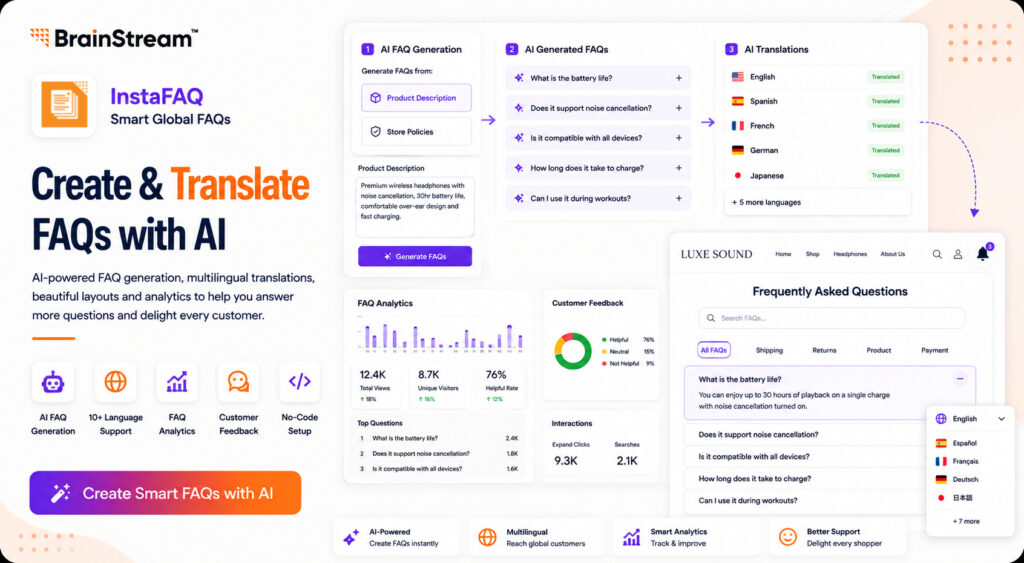
Best for: AI-powered and multilingual FAQ management
International stores may have hundreds of products and customers speaking different languages. Creating and translating FAQs manually can become difficult.
That’s where InstaFAQ – Smart Global FAQs comes in.
InstaFAQ uses AI to help merchants create, translate, display, and analyze FAQs.
Key Features
- AI FAQ generation
- Generate FAQs from product descriptions
- Generate FAQs from store policies
- AI-powered translations
- Support for 10+ languages
- Manual translation editing
- FAQ accordions
- Tabs
- Floating FAQ layouts
- FAQ analytics
- Customer feedback
- FAQ interaction tracking
For example, you could provide a product description and use AI to generate common questions around that product.
You can then translate those FAQs for international visitors.
Analytics Makes FAQs More Useful
InstaFAQ also adds an analytics layer.
Merchants can monitor FAQ views, popular questions, and customer interactions.
Customer feedback can help identify whether an answer was actually useful.
This turns the FAQ section from static content into something merchants can continue improving.
Who Should Use InstaFAQ?
It is particularly suitable for:
- International Shopify stores
- Stores with large catalogs
- Multilingual brands
- Businesses receiving many support questions
- Merchants wanting AI-assisted FAQ creation
7. BS Slide-In Sticky Banner
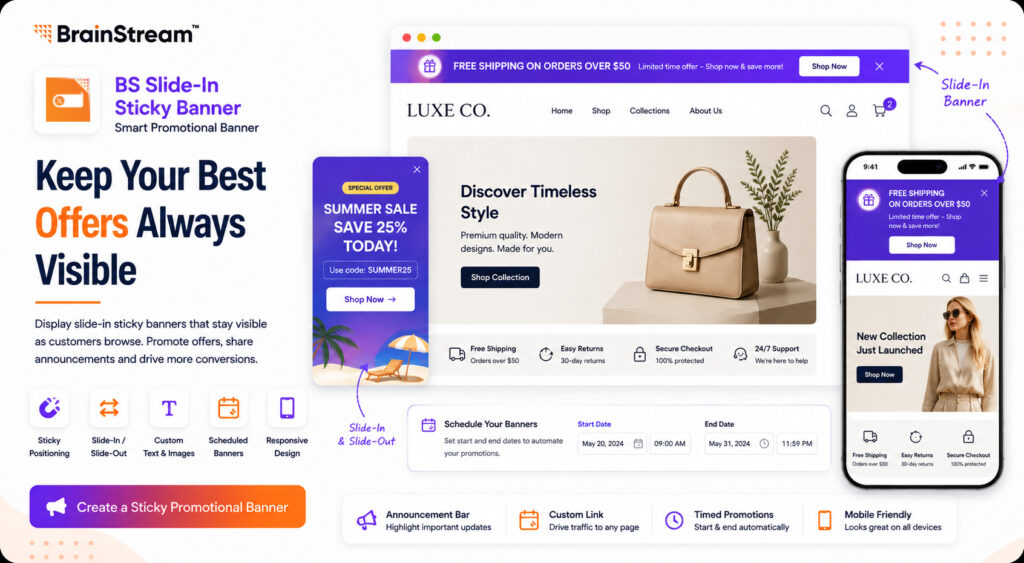
Best for: Keeping important promotions visible
Announcement bars usually appear at the top of ecommerce websites.
But once customers scroll down, important information may disappear.
BS Slide-In Sticky Banner provides a promotional banner designed to remain visible while customers browse.
Key Features
- Sticky positioning
- Slide-in and slide-out behavior
- Custom text
- Custom images
- Custom links
- Responsive design
- Scheduled banners
- Promotion start and end dates
- Announcement-bar functionality
The slide-in/out functionality allows customers to interact with the banner rather than having a large promotional element permanently cover content.
What Can You Promote?
For example:
FREE SHIPPING ON ORDERS OVER $50
or:
SUMMER SALE – SAVE 25% TODAY
or:
NEW COLLECTION JUST LAUNCHED → SHOP NOW
Other use cases include:
- Product launches
- Shipping updates
- Holiday offers
- Discount codes
- New arrivals
- Important store announcements
Scheduled start and end dates can also make campaign management easier.
8. InstaLabel – Product Labels
Best for: Advanced product labeling and promotional campaigns
Our final app brings product labels together with more advanced display rules and AI-assisted creation.
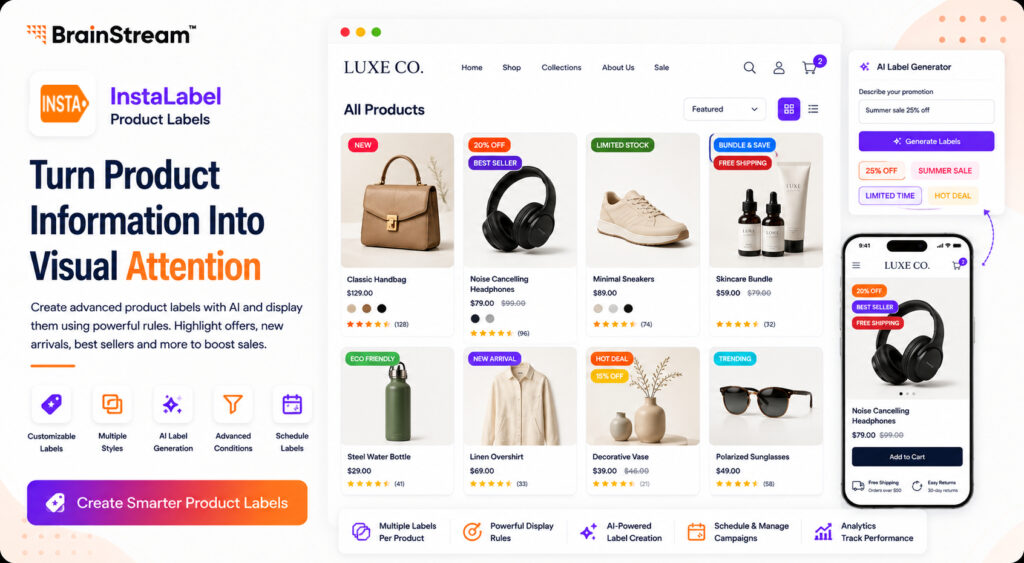
InstaLabel – Product Labels allows merchants to create product labels and promotional highlights for different merchandising situations.
Labels can be used for:
- Offers
- Inventory information
- Bundles
- Featured products
- New arrivals
- Materials
- Special promotions
Key Features
- Customizable product labels
- Multiple label styles
- Label animations
- Design customization
- Multiple labels on one product
- Product-based display rules
- Collection-based rules
- Tag-based rules
- Inventory-based conditions
- AI-generated product labels
- Advanced label conditions
- Label scheduling on supported plans
- Campaign management
- Analytics on supported plans
One particularly useful capability is applying multiple labels to a single product.
For example:
NEW
20% OFF
BEST SELLER
could communicate several pieces of information immediately.
The app also offers AI credits on paid plans for generating custom labels.
Who Should Use InstaLabel?
It can be useful for stores that frequently run:
- Seasonal campaigns
- New product launches
- Inventory promotions
- Collection-specific offers
- Large merchandising campaigns
Quick Comparison: Which Shopify App Should You Choose?
| App | Best For |
| OdooStream | Shopify + Odoo integration |
| Quick View | Faster product browsing |
| MarketFox | Multi-vendor marketplaces |
| Matchify | Similar product recommendations |
| BS Flash Deals | Flash deals and promotions |
| InstaFAQ | AI and multilingual FAQs |
| BS Slide-In Sticky Banner | Promotional announcements |
| InstaLabel | Advanced product labels |
You don’t necessarily need all 8 apps.
The right combination depends on the problems you want to solve.
For example, a growing retail store could combine Quick View + Matchify + InstaLabel to improve product discovery and merchandising.
An international store could use InstaFAQ to make customer information easier to access across languages.
A business using Odoo ERP can use OdooStream to connect ecommerce operations with its ERP.
And a business planning to operate a marketplace can consider MarketFox for vendor management.
How to Choose the Right Shopify Apps
Before installing any app, ask these five questions.
1. What Problem Am I Trying to Solve?
Don’t install apps simply because they look interesting.
Start with the business problem.
If customers cannot easily discover alternative products, look at product recommendations.
If your support team repeatedly answers the same questions, improve your FAQ system.
Shopify and Odoo require constant manual updates; investigate integration.
2. Will It Improve the Customer Experience?
Every new feature should make shopping easier, clearer, or more useful.
Avoid adding unnecessary elements that distract shoppers.
3. Is It Easy to Manage?
Your team should be able to configure the app without spending hours making simple changes.
4. Does It Work Well on Mobile?
Mobile usability matters for modern ecommerce stores.
Always test customer-facing features on different screen sizes.
5. Can It Support Your Growth?
Think beyond your current requirements.
The right tools should continue providing value as your catalog, customers, orders, and operations grow.
Build a Better Shopify Store with the Right Tools
There is no single app that solves every ecommerce challenge.
A successful Shopify technology stack combines tools based on actual business needs.
Might need Odoo integration to automate operations.
You might need better FAQs to reduce repetitive support requests.
You could use product labels and similar-product recommendations to improve discovery.
Or perhaps your next step is building an entire multi-vendor marketplace.
The important thing is to identify the problem first and then select the right solution.
These 8 Shopify apps from BrainStream Technolabs cover different parts of that journey, from backend automation to customer-facing merchandising and marketplace management.
Ready to Improve Your Shopify Store?
Explore the apps, choose the tools that match your goals, and start improving the way customers interact with your Shopify store.
Frequently Asked Questions
1. What are the best Shopify apps for growing an online store?
The best Shopify apps depend on your goals. Stores can use apps for product recommendations, FAQs, promotions, product labels, ERP integration, marketplace management, and other specific requirements. Choose apps based on problems you need to solve rather than the number of features available.
2. How can I improve product discovery on Shopify?
Features such as Quick View, similar-product recommendations, product labels, and well-organized collections can make it easier for shoppers to discover relevant products.
3. Can Shopify integrate with Odoo ERP?
Yes. Shopify can be connected with Odoo using an integration solution such as OdooStream. It supports synchronization of important ecommerce and ERP data, including products, customers, orders, inventory, payments, shipments, refunds, and categories.
4. Can I create a multi-vendor marketplace using Shopify?
A multi-vendor application can add vendor-management functionality to Shopify. MarketFox, for example, provides vendor registration, product and inventory management, commission management, order management, and other marketplace features.
5. How can AI be used in Shopify FAQs?
AI can help generate FAQs from existing information such as product descriptions and store policies. InstaFAQ also supports AI-assisted translation into multiple languages, making FAQs more scalable for international stores.
6. Are these Shopify apps suitable for mobile stores?
The customer-facing apps in this list include responsive or mobile-oriented functionality. However, merchants should always test new storefront features across their own theme and devices before launching them widely.

Manish Khilwani
Author
Co-Founder at BrainStream Technolabs, he focuses on building people-first, scalable eCommerce and digital products that help brands grow with clarity and innovation.
Table of contents
BLOGS
Learn & Grow with Us
Get the latest updates on trends and strategies that shape the business world. Our insights are here to keep you informed and inspired.

2026 Generative AI Playbook: A Strategic Guide for Business Leaders
The digital landscape has officially crossed a Rubicon. If 2023…
Agentic Commerce in 2026: How AI Agents Are Changing Online Shopping
Agentic commerce is online shopping where AI agents discover, compare,…
AI Advisory & Roadmap Services: How Businesses Build Smarter AI Strategies?
Artificial intelligence is changing how businesses operate. However, many companies…

AI Chatbots in Healthcare: Benefits and Use Cases That Are Transforming Patient Care
AI Chatbots in Healthcare are changing faster than ever. Patients…