Operational vs Analytical vs Collaborative CRM: Which Is Best for Your Business?
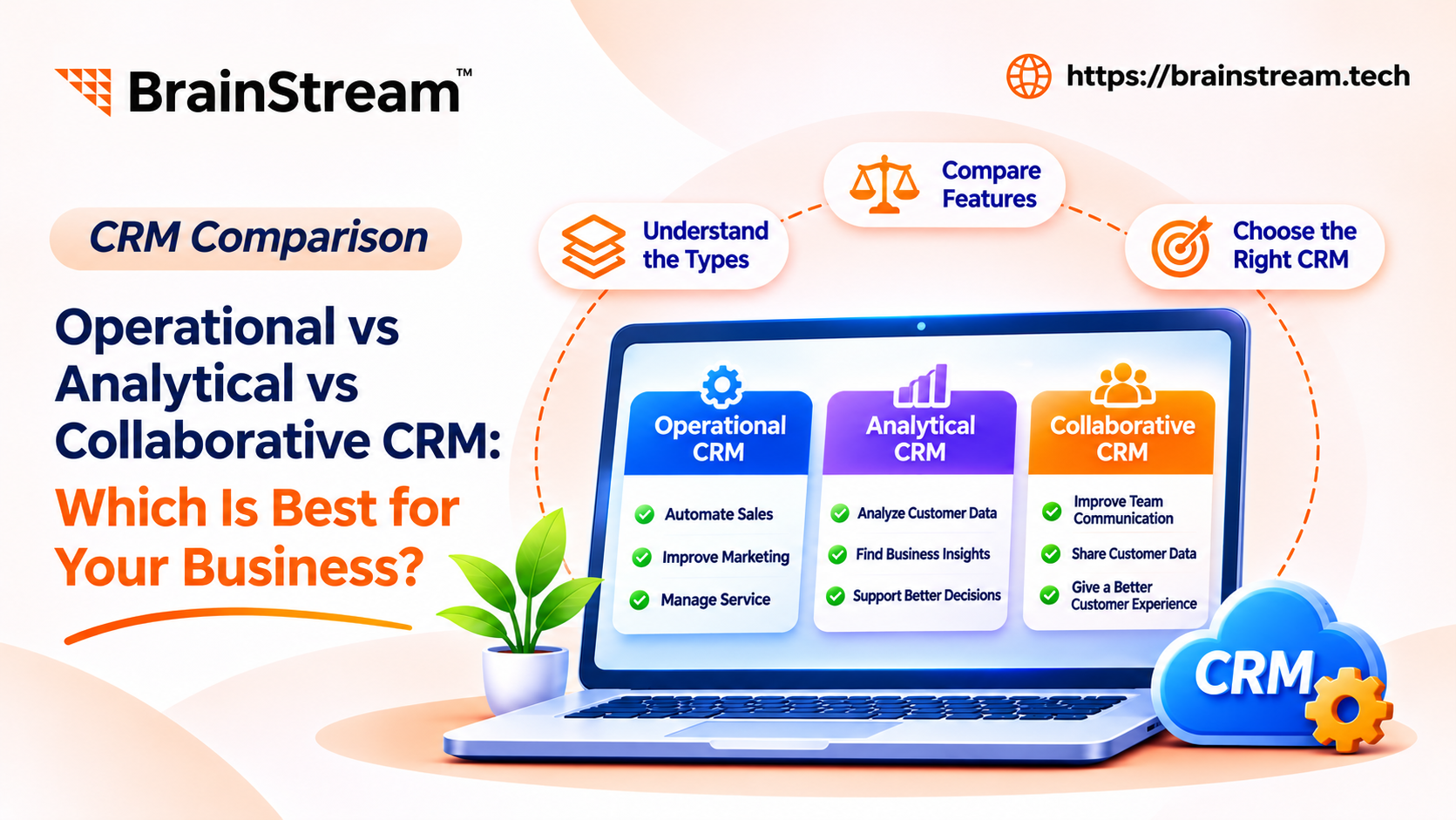
Operational CRM automates day-to-day sales, marketing, and customer support tasks. Analytical CRM turns customer data into reports, forecasts, and useful insights. Meanwhile, collaborative CRM helps teams share customer information and deliver consistent service.
Most growing businesses start with operational CRM. However, many modern CRM platforms combine all three types.
In this guide, we compare operational vs analytical vs collaborative CRM, explain their features, and share practical examples. You will also learn how to choose the right CRM for your business.
What Is CRM Software?
CRM (Customer Relationship Management) software is a tool that helps businesses manage customer data, interactions, sales activities, marketing campaigns, and support processes in one centralized system.
Instead of storing customer information across emails, spreadsheets, and multiple tools, CRM software creates a single source of truth. This allows teams to:
- Track leads and customers
- Improve communication
- Automate repetitive tasks
- Increase sales productivity
- Deliver better customer experiences
But the real power of CRM lies in choosing the right CRM type based on your business goals.
Why Is Understanding CRM Types Important?
Many businesses fail to get results from CRM because they select the wrong type.
For example:
- A sales-focused company might choose an analytics-heavy CRM and struggle with adoption
- A data-driven company might choose a basic CRM and miss valuable insights
Understanding CRM types helps you:
- Avoid unnecessary features and costs
- Improve CRM adoption across teams
- Align CRM functionality with business goals
- Scale your CRM system as your business grows
Three Main Types of CRM Software
CRM software is broadly categorized into three types:
- Operational CRM – Focused on automation
- Analytical CRM – Focused on data & insights
- Collaborative CRM – Focused on communication & teamwork
Let’s explore each one in detail.
1. Operational CRM: Meaning, Features and Examples
What Is Operational CRM?
Operational CRM is designed to automate and streamline day-to-day business operations, especially in sales, marketing, and customer support.
It helps businesses handle customer interactions efficiently while reducing manual work.
Key Features of Operational CRM
- Lead capture & lead management
- Sales pipeline tracking
- Marketing automation (emails, campaigns)
- Customer support & ticket management
- Workflow automation
- Task & activity management
Benefits of Operational CRM
Operational CRM delivers immediate value because it focuses on execution.
Main benefits include:
- Faster lead response times
- Improved sales productivity
- Reduced manual data entry
- Better customer follow-ups
- Consistent customer communication
Best Use Cases for Operational CRM
Operational CRM is ideal for:
- Startups and growing businesses
- Sales-driven organizations
- E-commerce businesses
- Service-based companies
- Call centers and support teams
Example Scenario
A digital agency uses Operational CRM to:
- Capture leads from website forms
- Automatically assign leads to sales reps
- Track deal progress
- Send automated follow-up emails
This improves conversion rates without increasing workload.
Real-World Examples of Operational CRM
Example 1: Lead Management for a Real Estate Agency
A real estate agency receives enquiries through its website, property portals, and social media. An operational CRM can collect these leads in one place and assign them to available agents.
Additionally, the system can schedule follow-up reminders, track property visits, and update deal stages. As a result, sales teams can respond faster and reduce missed opportunities.
Example 2: Sales Automation for a B2B Company
A B2B company may use operational CRM to manage quotations, follow-up emails, and sales pipelines. For example, when a new enquiry arrives, the CRM can create a lead and assign a task to the right salesperson.
Moreover, automated reminders help teams stay connected with prospects throughout the buying process.
Example 3: Customer Support for an Online Store
An eCommerce business can connect customer enquiries with order information. Therefore, support agents can view previous conversations and resolve common issues more efficiently.
Platforms such as Salesforce Sales Cloud, HubSpot Sales Hub, and Zoho CRM offer features commonly used for operational CRM tasks. However, the exact capabilities depend on the product and subscription.
Limitations of Operational CRM
- Limited deep data analysis
- Not ideal for long-term forecasting
- Less focus on advanced reporting
2. Analytical CRM: Meaning, Examples and Applications
What Is Analytical CRM?
Analytical CRM focuses on collecting, analyzing, and interpreting customer data to help businesses make smarter decisions.
Instead of just managing customer interactions, it helps businesses understand customer behavior.
Key Features of Analytical CRM
- Customer data analysis
- Sales forecasting
- Customer segmentation
- Performance dashboards
- Trend analysis
- Predictive analytics
Benefits of Analytical CRM
Analytical CRM helps businesses shift from guesswork to data-driven decisions.
Key benefits include:
- Better understanding of customer behavior
- Improved marketing ROI
- Accurate sales forecasting
- Identification of high-value customers
- Smarter business strategies
Best Use Cases for Analytical CRM
Analytical CRM is ideal for:
- Data-driven organizations
- Mid-size and enterprise businesses
- SaaS companies
- Businesses with large customer databases
- Marketing-focused teams
Example Scenario
A SaaS company uses Analytical CRM to:
- Identify which users are most likely to churn
- Analyze campaign performance
- Segment customers based on behavior
- Improve upsell and cross-sell strategies
Real-World Examples of Analytical CRM
Example 1: Customer Churn Analysis for SaaS
A SaaS company can study product usage, subscription history, and support activity to identify customers who may cancel.
For example, a drop in logins or repeated support issues may signal dissatisfaction. Analytical CRM dashboards can help teams identify patterns and plan retention campaigns.
Example 2: Sales Forecasting for a Retail Business
A retailer can analyze past sales, seasonal demand, and customer purchase patterns. As a result, managers can make more informed decisions about inventory and marketing budgets.
Additionally, reports can show which products generate repeat purchases and which customer groups deliver higher revenue.
Example 3: Customer Segmentation for Marketing
A marketing team can group customers by purchase frequency, average order value, and engagement.
For example, loyal customers may receive early access to new products, while inactive customers receive re-engagement campaigns.
Analytical features are available through reporting and analytics modules in platforms such as Salesforce, Microsoft Dynamics 365, and Zoho Analytics. Some businesses also connect CRM data to business intelligence tools.
Limitations of Analytical CRM
- Requires clean and accurate data
- More complex to implement
- Not focused on day-to-day task automation
3. Collaborative CRM System: Meaning, Examples and Benefits
What Is Collaborative CRM?
Collaborative CRM focuses on sharing customer information across teams to deliver a consistent and seamless customer experience.
It removes communication gaps between departments like sales, marketing, and customer support.
Key Features of Collaborative CRM
- Shared customer profiles
- Interaction history across teams
- Internal communication tools
- Integration with email, chat, and messaging platforms
- Omnichannel communication support
Benefits of Collaborative CRM
Collaborative CRM improves teamwork and customer satisfaction.
Key benefits include:
- Better internal collaboration
- Unified customer communication
- Improved customer experience
- Reduced information silos
- Faster issue resolution
Best Use Cases for Collaborative CRM
Collaborative CRM works best for:
- Large teams
- Customer-centric organizations
- B2B businesses
- Enterprises with multiple departments
- Businesses focused on long-term relationships
Example Scenario
A B2B company uses Collaborative CRM so:
- Sales can view past support issues
- Marketing can see sales conversations
- Support teams understand customer history
This ensures consistent messaging at every touchpoint.
Real-World Examples of Collaborative CRM
Example 1: Shared Customer History for B2B Sales
A B2B company may have separate sales, account management, and support teams. Collaborative CRM helps these teams access relevant customer information from one system.
For example, an account manager can review recent support issues before discussing a contract renewal. Therefore, the customer does not need to repeat the same information.
Example 2: Omnichannel Support for eCommerce
An online retailer receives customer questions through email, live chat, phone calls, and messaging apps.
A collaborative CRM system can bring these conversations together. As a result, support agents can understand earlier interactions and provide more consistent responses.
Example 3: Team Collaboration Across Locations
A company with teams in Dubai, London, and New York may need shared access to customer records and communication history.
Collaborative CRM can help employees coordinate follow-ups, assign responsibilities, and track customer requests across departments.
Platforms such as Microsoft Dynamics 365, Salesforce, and Zoho CRM offer collaboration and customer information-sharing features. However, integrations and subscription requirements vary.
Limitations of Collaborative CRM
- Less focus on automation
- Limited advanced analytics
- Requires team discipline and adoption
Operational vs Analytical vs Collaborative CRM: Quick Comparison
| Feature | Operational CRM | Analytical CRM | Collaborative CRM |
| Primary Focus | Automation | Data & insights | Team collaboration |
| Best For | Sales & execution | Strategy & decisions | Customer experience |
| Complexity | Low | Medium–High | Medium |
| Automation | High | Low | Medium |
| Reporting | Basic | Advanced | Basic |
| Team Alignment | Medium | Low | High |
Which CRM Software Type Is Best for Your Business?
There is no single winner; the best CRM depends on your business goals.
Operational CRM if:
- You want quick results
- Your sales team needs automation
- You want easy CRM adoption
Analytical CRM if:
- Data drives your decisions
- You want better forecasting
- You focus on long-term growth
Collaborative CRM if:
- Multiple teams handle customers
- Customer experience is your priority
- You need better internal alignment
Pro Tip:
Most modern CRM platforms combine all three CRM types, making it possible to scale without switching systems.
CRM Trends in 2026 You Should Know
AI-powered CRM automation: Businesses are using AI to assist with lead qualification, follow-ups, and customer support. Additionally, AI agent development for CRM can help connect intelligent workflows with business applications.
Predictive analytics and forecasting: Analytical CRM tools help teams study sales history and customer behavior. Therefore, businesses can identify patterns, estimate demand, and make better decisions.
Omnichannel customer engagement: Customers expect consistent communication across email, phone, live chat, and social platforms. Collaborative CRM helps teams maintain shared customer records across these channels.
CRM integrations with WhatsApp and messaging apps: Messaging is an important customer communication channel in markets such as the UAE, Saudi Arabia, and Qatar. Therefore, businesses may connect WhatsApp Business Platform messaging with their CRM to manage enquiries, support requests, and follow-ups.
Industry-specific CRM solutions: Different industries need different workflows. For example, healthcare, real estate, and manufacturing businesses may require specialized processes. Our custom CRM vs Salesforce vs HubSpot comparison explains when tailored software may be more suitable than an existing platform.
How Can a CRM Development Company Help?
A professional CRM development company can:
- Customize CRM features
- Integrate third-party tools
- Build scalable CRM solutions
- Ensure data security & performance
- Optimize CRM for your industry
Custom CRM development ensures you get exactly what your business needs, not unnecessary features.
Businesses can also use open-source platforms to support their CRM workflows. For example, our SuiteCRM development services help teams customize modules, automate processes, and connect business applications.
Final Summary
Understanding CRM software types is essential for choosing the right system.
- Operational CRM improves efficiency
- Analytical CRM delivers insights
- Collaborative CRM enhances teamwork
The best CRM software in 2026 is the one that aligns with your business goals, team structure, and growth plans.
Need a CRM That Fits Your Business?
Looking for a CRM that combines operational automation, analytical reporting, and team collaboration?
BrainStream Technolabs helps businesses plan and develop CRM solutions based on their workflows, integrations, and growth goals.
Explore our custom CRM development services and book a free CRM consultation to discuss your requirements.
FAQs
1. Which CRM software type is best for small businesses?
Operational CRM is best for small businesses due to ease of use and quick ROI.
2. Can one CRM include all three types?
Yes, many modern CRM systems combine operational, analytical, and collaborative features.
3. Is custom CRM better than ready-made CRM?
Custom CRM is ideal if your business has unique workflows or industry-specific needs.
4. What is analytical CRM?
Analytical CRM uses customer data, reports, and forecasting tools to help businesses understand customer behavior and make informed decisions. It supports activities such as customer segmentation, sales forecasting, and campaign analysis.Custom CRM is ideal if your business has unique workflows or industry-specific needs.
5. What is an example of collaborative CRM?
A customer support team sharing conversation history with the sales team is an example of collaborative CRM. It helps both departments understand customer needs and provide consistent service.
6. What is the difference between operational and analytical CRM?
Operational CRM focuses on automating daily sales, marketing, and support activities. In contrast, analytical CRM uses customer data to identify patterns, measure performance, and support business decisions.
7. What is a collaborative CRM system used for?
A collaborative CRM system helps sales, marketing, and support teams share customer information and communication history. As a result, teams can coordinate activities and improve customer experiences.

Manish Khilwani
Author
Co-Founder at BrainStream Technolabs, he focuses on building people-first, scalable eCommerce and digital products that help brands grow with clarity and innovation.
Table of contents
BLOGS
Learn & Grow with Us
Get the latest updates on trends and strategies that shape the business world. Our insights are here to keep you informed and inspired.
2026 Generative AI Playbook: A Strategic Guide for Business Leaders
The digital landscape has officially crossed a Rubicon. If 2023…

Agentic Commerce in 2026: How AI Agents Are Changing Online Shopping
Agentic commerce is online shopping where AI agents discover, compare,…
AI Advisory & Roadmap Services: How Businesses Build Smarter AI Strategies?
Artificial intelligence is changing how businesses operate. However, many companies…
AI Agent Security: How to Control Access, Data and Autonomous Actions
AI agents can do more than answer questions. They can…